
Engee — a modern engineering platform built to replace MATLAB, Simulink, and Amesim.
The shifting landscape of engineering software presents a new challenge for technical teams: finding an alternative to well-established CAE, MBSE, MBD systems like MATLAB, Simulink, and Amesim — without disrupting workflows or sacrificing years of accumulated experience.
This transition demands a platform that integrates seamlessly with existing processes, is easy to deploy across engineering teams, and provides tools that feel familiar to experienced professionals.
That solution is here. It’s called Engee.
This transition demands a platform that integrates seamlessly with existing processes, is easy to deploy across engineering teams, and provides tools that feel familiar to experienced professionals.
That solution is here. It’s called Engee.
What is Engee?
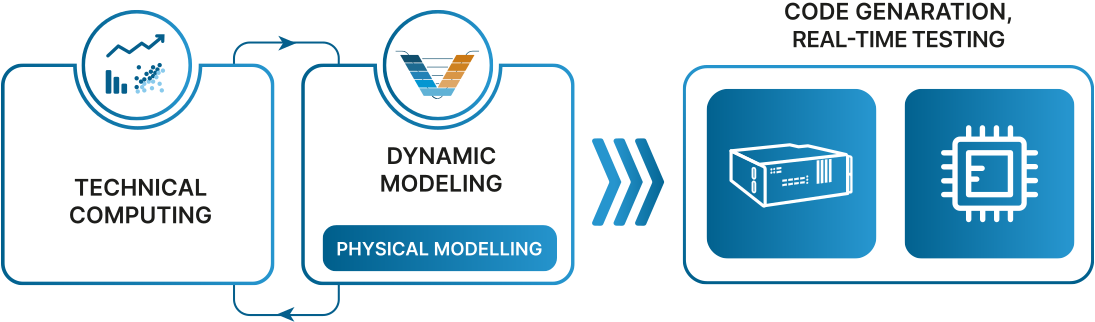
Engee is a modern engineering platform for developing complex technical systems. It brings together two key capabilities in a single environment:
- Technical Computing – A powerful ecosystem for data analysis, mathematical modeling, and custom application development, similar to what engineers know from MATLAB.
- Visual System Modeling – A block-diagram-based environment, reminiscent of Simulink or Amesim, for building control algorithms and physical system simulations, with support for real-time testing and automatic code generation for embedded systems.
What sets Engee apart is the seamless integration between code-based workflows and visual modeling. Simulation data and modeling logic can be accessed and manipulated directly from within scripts, and simulations can be fully automated using a high-level engineering programming language. Unlike platforms that require networked communication between separate tools, Engee offers built-in synergy — secure, fast, and deeply integrated. Previously, this was only available with platforms like MATLAB/Simulink. Now, Engee delivers the same experience natively.
Built from the ground up with model-based design (MBD) in mind, Engee is suitable for a wide range of engineering applications — from control systems and navigation to wireless communications, radar, and AI-driven research. Whether you're an engineer, researcher, or scientist, Engee equips you with the tools to design, simulate, analyze, and deploy.
- Technical Computing – A powerful ecosystem for data analysis, mathematical modeling, and custom application development, similar to what engineers know from MATLAB.
- Visual System Modeling – A block-diagram-based environment, reminiscent of Simulink or Amesim, for building control algorithms and physical system simulations, with support for real-time testing and automatic code generation for embedded systems.
What sets Engee apart is the seamless integration between code-based workflows and visual modeling. Simulation data and modeling logic can be accessed and manipulated directly from within scripts, and simulations can be fully automated using a high-level engineering programming language. Unlike platforms that require networked communication between separate tools, Engee offers built-in synergy — secure, fast, and deeply integrated. Previously, this was only available with platforms like MATLAB/Simulink. Now, Engee delivers the same experience natively.
Built from the ground up with model-based design (MBD) in mind, Engee is suitable for a wide range of engineering applications — from control systems and navigation to wireless communications, radar, and AI-driven research. Whether you're an engineer, researcher, or scientist, Engee equips you with the tools to design, simulate, analyze, and deploy.
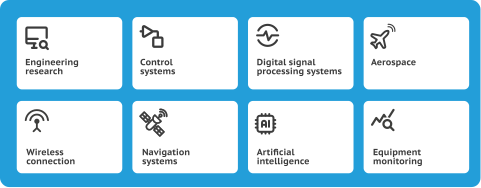
Engee Application Areas
Engee Is Built for the Way Engineers Work Today
One of Engee’s most powerful architectural features is its cloud-native, browser-based interface — built on a client-server model. All computing and simulation tasks are executed on a central server (either in a secure enterprise network or cloud), while engineers access the environment via a standard web browser.
This means:
This means:
- No installation required — Engee runs entirely in the browser
- Platform-independent — works on Windows, Linux, macOS, Astra Linux, RED OS
- Centralized resource management — IT teams can manage updates, storage, and performance from one place
- Instant access for teams — anyone on your network or VPN can use Engee without complex setup
- Secure deployment — Engee can be hosted in closed enterprise environments with full compliance and data protection

Engee Cloud Architecture
The Engineering Language Behind Engee: Julia
At the heart of Engee is the Julia language — a modern, open-source programming language purpose-built for high-performance scientific and engineering computing.
Why Julia?
Julia delivers:
“We want a language that’s as fast as C, as dynamic as Ruby, as familiar as MATLAB, as powerful as Lisp, and as productive as Python or R — all while being open and interactive.”
This is exactly what engineers get with Engee: the ability to write expressive, high-performance code in a language that feels natural — especially for those coming from MATLAB. For many users, Julia offers a cleaner, faster, and more future-proof alternative.
Why Julia?
Julia delivers:
- The speed of C
- The readability of Python
- The mathematical clarity of MATLAB
- The flexibility of modern scripting languages
“We want a language that’s as fast as C, as dynamic as Ruby, as familiar as MATLAB, as powerful as Lisp, and as productive as Python or R — all while being open and interactive.”
This is exactly what engineers get with Engee: the ability to write expressive, high-performance code in a language that feels natural — especially for those coming from MATLAB. For many users, Julia offers a cleaner, faster, and more future-proof alternative.

This is exactly what engineers get with Engee: the ability to write expressive, high-performance code in a language that feels natural — especially for those coming from MATLAB. For many users, Julia offers a cleaner, faster, and more future-proof alternative.

Engee multilingual environment
Interactive Notebooks for Engineering Workflows
Engee’s computing environment centers around live scripts — modern engineering notebooks that combine code, visualizations, equations, media, and rich commentary in one place. Similar to MATLAB Live Scripts or Jupyter Notebooks, these documents allow engineers to:
- Run code cell-by-cell or as a whole
- Add formatted text, charts, LaTeX formulas, and outputs
- Debug incrementally and visualize intermediate results
- Export to PDF or HTML for documentation and reporting
- Enjoy syntax highlighting, code suggestions, and auto-completion
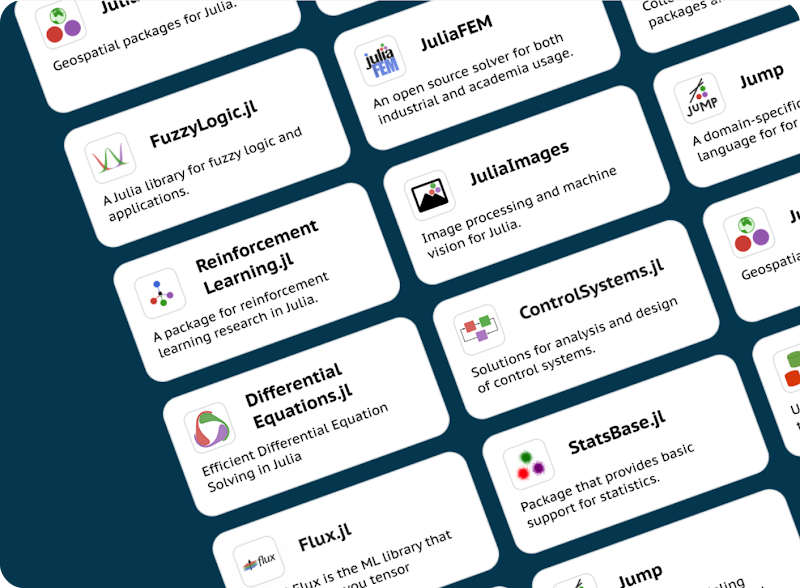
Julia libraries
Ready for Real Engineering
Engee includes everything engineers expect from a technical computing platform:
- Import from Excel, MAT files, multimedia, or binary formats
- Perform numerical analysis, optimization, filtering, statistics, signal processing
- Apply machine learning and AI models directly within your scripts
- Use open-source Julia libraries for any domain: control systems, communications, image processing, symbolic math, neural networks, physics, and more
- Leverage proprietary system objects and functions for real-time digital signal processing, phased arrays, communication systems, and even 5G design
Engee: A Complete Platform for Model-Based Design
Model-Based Design (MBD) is a development methodology that uses dynamic system models throughout the engineering lifecycle — from early concept to real-time deployment. Engee is purpose-built to support this approach, offering a fully integrated, block-diagram-based modeling environment that rivals the most advanced international tools.
Much like Simulink, Amesim, or Simscape, Engee allows engineers to model complex systems using directional blocks and physical modeling components. But what sets Engee apart is that it was designed from day one to support the entire MBD workflow, not just simulation.
With Engee, you can:
Much like Simulink, Amesim, or Simscape, Engee allows engineers to model complex systems using directional blocks and physical modeling components. But what sets Engee apart is that it was designed from day one to support the entire MBD workflow, not just simulation.
With Engee, you can:
- Model multidomain systems — mechanical, electrical, thermal, hydraulic, and more
- Simulate the interaction between discrete control algorithms and continuous physical processes
- Validate behavior under all operating conditions before hardware is available
- Automatically generate C code for microcontroller deployment or Verilog HDL for FPGAs
- Run real-time simulations on hardware-in-the-loop (HIL) platforms like RITM
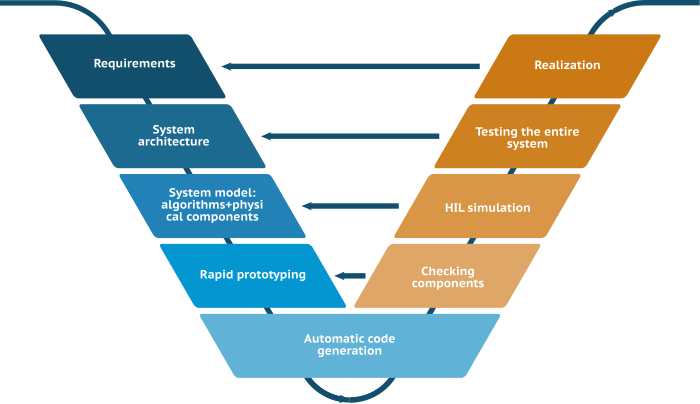
The V-cycle of Model-Based Design
Multidomain System Modeling Made Easy
Engee includes a comprehensive library of ready-to-use blocks for building advanced system architectures in domains such as:
Just like in Simulink, Engee blocks are validated against known references, ensuring compatibility and predictability. This dramatically reduces learning curves and accelerates migration from other platforms — engineers use familiar structures, get consistent simulation results, and require minimal retraining.
- Control systems and automation
- Communications and wireless (including 5G, LTE)
- Radar and phased arrays
- Navigation and sensor fusion
- Electromechanical, hydraulic, and thermal systems
Just like in Simulink, Engee blocks are validated against known references, ensuring compatibility and predictability. This dramatically reduces learning curves and accelerates migration from other platforms — engineers use familiar structures, get consistent simulation results, and require minimal retraining.
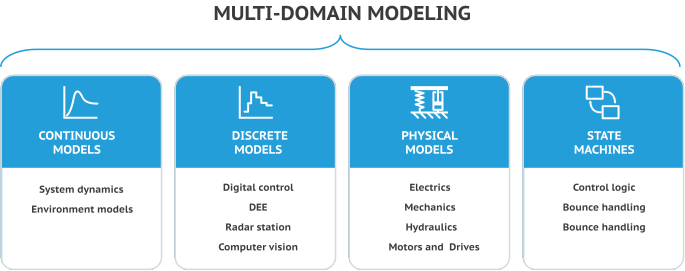
Multi-domain modeling in Engee
Physical Modeling with Acausal Components
Engee also features a physical modeling engine, similar to Simscape or Amesim. Using acausal connectors and energy-based modeling, engineers can rapidly assemble simulations of systems like:
This is ideal for building digital twins, refining requirements, and exploring edge-case performance — all within one unified environment.
- Electric motors and drives
- Power converters and rectifiers
- Hydraulic actuators and pumps
- Thermal management systems
- Multi-domain mechatronic assemblies
This is ideal for building digital twins, refining requirements, and exploring edge-case performance — all within one unified environment.
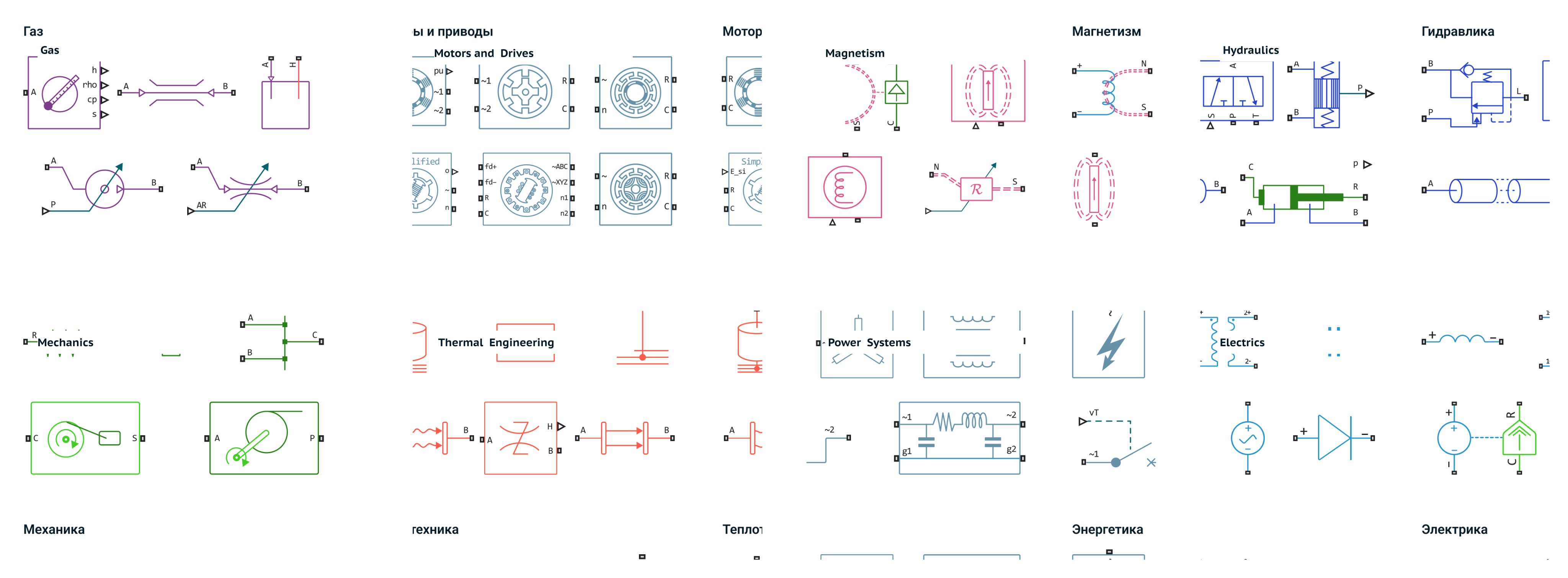
Physical library domains in Engee
Embedded Code Generation: From Simulation to Hardware
One of the most powerful features of Engee is its automatic code generation. Once you’ve modeled and tested your control algorithm or signal processing pipeline, you can instantly export:
Engee supports integration with external IDEs and build systems, enabling engineers to incorporate generated code into real-world products or mix it with handcrafted routines.
- Readable, standalone C code — ready for integration into embedded projects
- Fixed- or floating-point precision — for microcontrollers and DSPs
- Verilog HDL — for implementation on FPGAs
Engee supports integration with external IDEs and build systems, enabling engineers to incorporate generated code into real-world products or mix it with handcrafted routines.
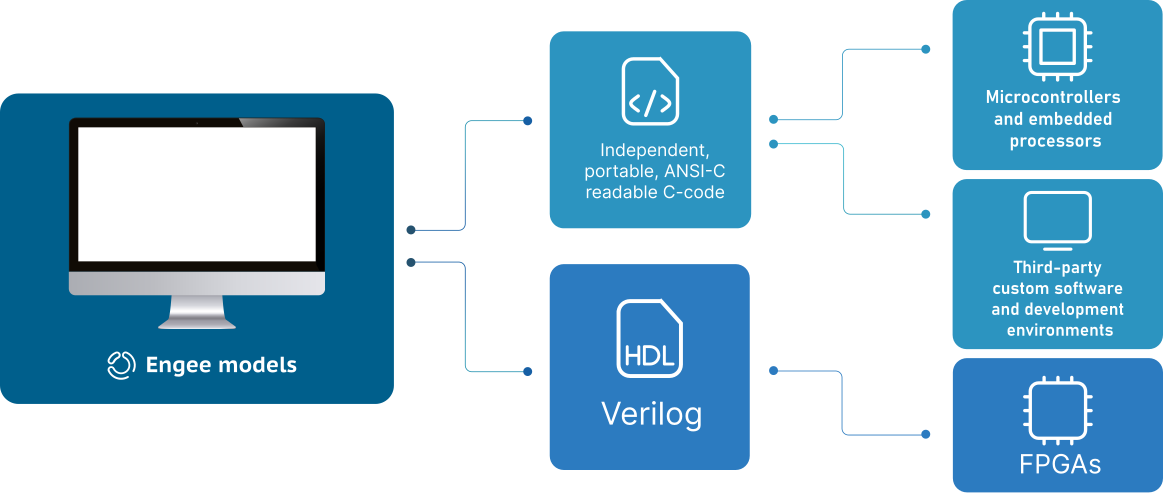
Automatic code generation in Engee
Real-Time Testing with Hardware-in-the-Loop
Engee supports execution of models on RITM hardware for real-time testing — allowing engineers to validate algorithms against physical signals and hardware interfaces. This includes handling real-world effects like delay, quantization, and noise.
Originally developed for use with Simulink, RITM systems are now fully supported by Engee — offering an integrated solution for HIL testing and rapid control prototyping.
Originally developed for use with Simulink, RITM systems are now fully supported by Engee — offering an integrated solution for HIL testing and rapid control prototyping.
Engee: Smooth Migration. Powerful Continuity.
Adopting a new CAE platform can feel daunting — especially when you’ve invested years in MATLAB scripts, Simulink models, or Amesim simulations. That’s why Engee is designed not just as a replacement, but as a migration platform — offering compatibility, continuity, and confidence.
Use What You’ve Already Built
With Engee, your existing engineering assets remain valuable:
Use What You’ve Already Built
With Engee, your existing engineering assets remain valuable:
- Run MATLAB functions directly inside Engee
- Convert .mlx scripts into interactive Engee notebooks
- Import Simulink models or co-simulate with them inside the platform
- Integrate existing C code or build your own custom blocks
- Work with Julia, Python, MATLAB-like syntax, or C interchangeably
Designed for Gradual Adoption
Migration doesn’t have to be a single leap. With Engee, you decide what to move and when. You can begin with one part of your model or script, test the performance and results, and expand as needed.
- Engee’s Julia syntax is 90% similar to MATLAB, making it easy for engineers to read and adapt
- Visual blocks in Engee behave exactly like Simulink, ensuring expected simulation outcomes
- Users can create custom libraries and extend the environment without restrictions
- Support for open standards and open-source libraries prevents vendor lock-in
Expert-Led Development, Built for Real Engineering
Engee was developed by a team with decades of experience in control system design, real-time simulation, and model-based methodologies — with direct contributions to industries like:
- Aerospace and UAVs
- Automotive and autonomous systems
- Radio systems, LTE, 5G, and TETRA networks
- Radar, navigation, and sensor fusion
- Artificial intelligence and scientific computing
The Most Complete Alternative to MATLAB, Simulink, and Amesim
Engee isn’t just “comparable” — it’s the only platform that brings together:
- A full-featured environment for technical computing
- A visual modeling engine for MBD and system simulation
- Embedded C and HDL code generation
- Real-time HIL simulation support
- Browser-based, cloud-native access
- Compatibility with Russian operating systems and infrastructure
- Native Russian-language interface and documentation
Whether you're modernizing workflows, improving resilience, or seeking technological independence — Engee gives you the power, compatibility, and support to lead with confidence.